Master Python Programming with Unit 3 (Introduction to Python) and Unit 4 (Control Structures) together in one page — live in-browser execution, interactive memory & loop visualizers, list operations lab, gamified quizzes, and AI tutor support!
Live Execution Engine
In-Browser Python Simulator
Test any Python code right inside your browser! Type or edit the code below and press Run Code.
Python 3 Sandbox
# Python 3 Practical Demo
name = "Student"
age = 16
print("Welcome to Cyber-Learn Python Studio!")
print("Hello,", name, "- Age:", age)

a = 10
b = 3
print("10 // 3 =", a // b)
print("10 ** 3 =", a ** b)
Click "Run Code" to view program output here.
Unit 3 • Section 3.1
3.1 Introduction to Python Programming
Python is a high-level, widely-used programming language famous for its simplicity and readability. It is versatile and is used worldwide in fields like web development, data analysis, and artificial intelligence (AI).
3.1.1 Basic Programming Concepts
Computer programming is the process of creating a set of instructions that tell a computer how to perform a task. The programming lifecycle consists of four steps:
Write Code: Type the instructions in a code editor.
Compile / Interpret: The computer translates code into machine language (0s and 1s).
Execute: Run the program to produce the desired result.
Fix Errors (Debugging): Correct logic or syntax mistakes if results differ from expectation.
Setting Up the Python Development Environment
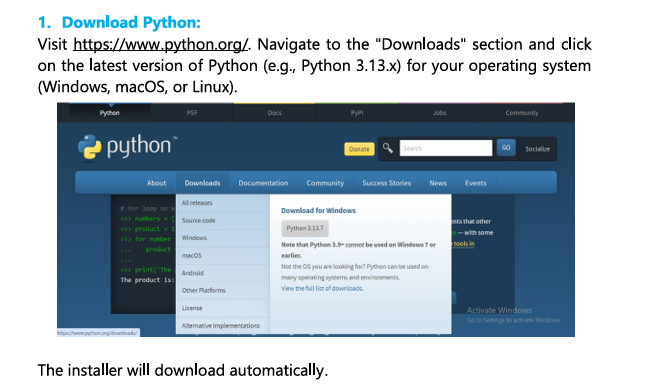
Download Python: Visit https://www.python.org, navigate to Downloads, and get the latest version (e.g., Python 3.13.x).
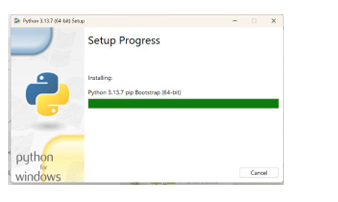
Install Python: Run the downloaded installer.
CRITICAL STEP: Check the box "Add Python to PATH" during setup so system command line can access Python.
Set up an IDE: Use PyCharm (Community Edition), VS Code, or IDLE (built into Python).
Configure IDE: Set interpreter path (e.g., C:\Python312\python.exe).
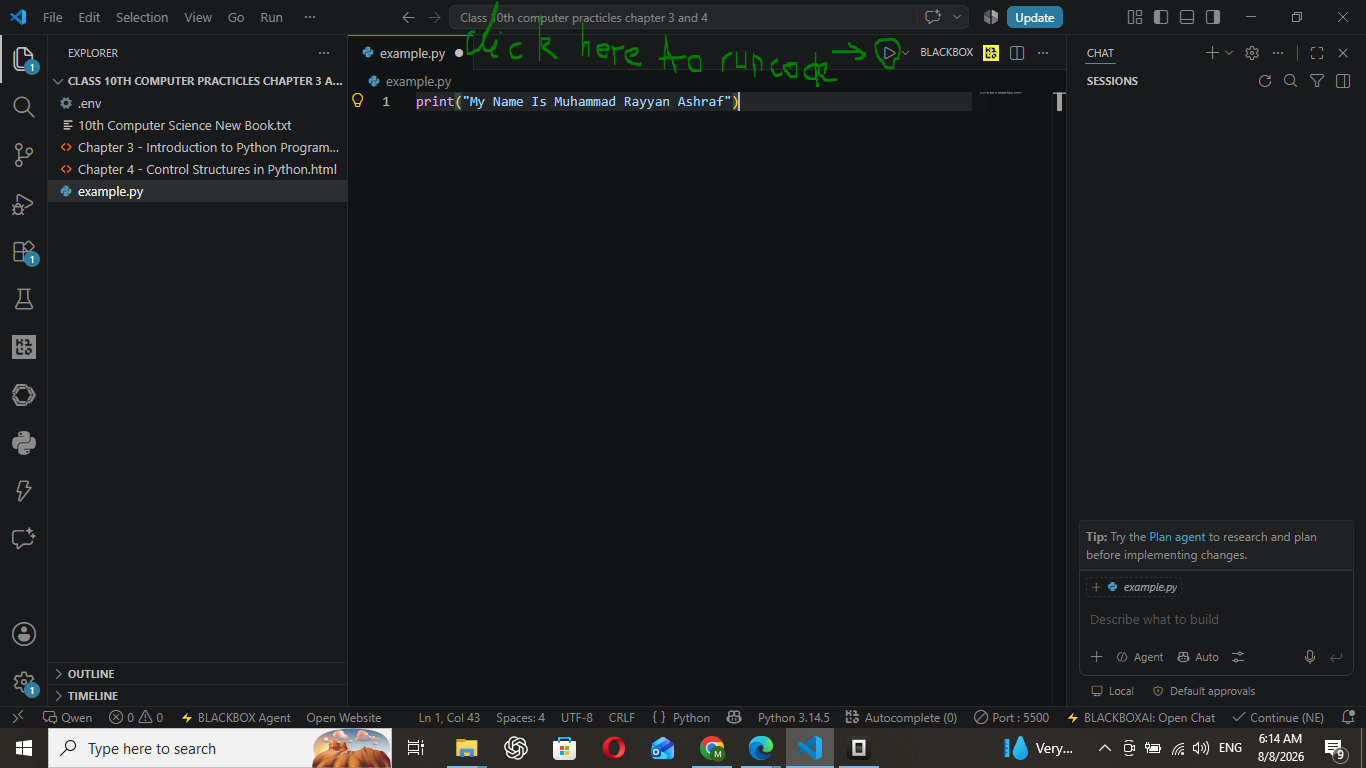
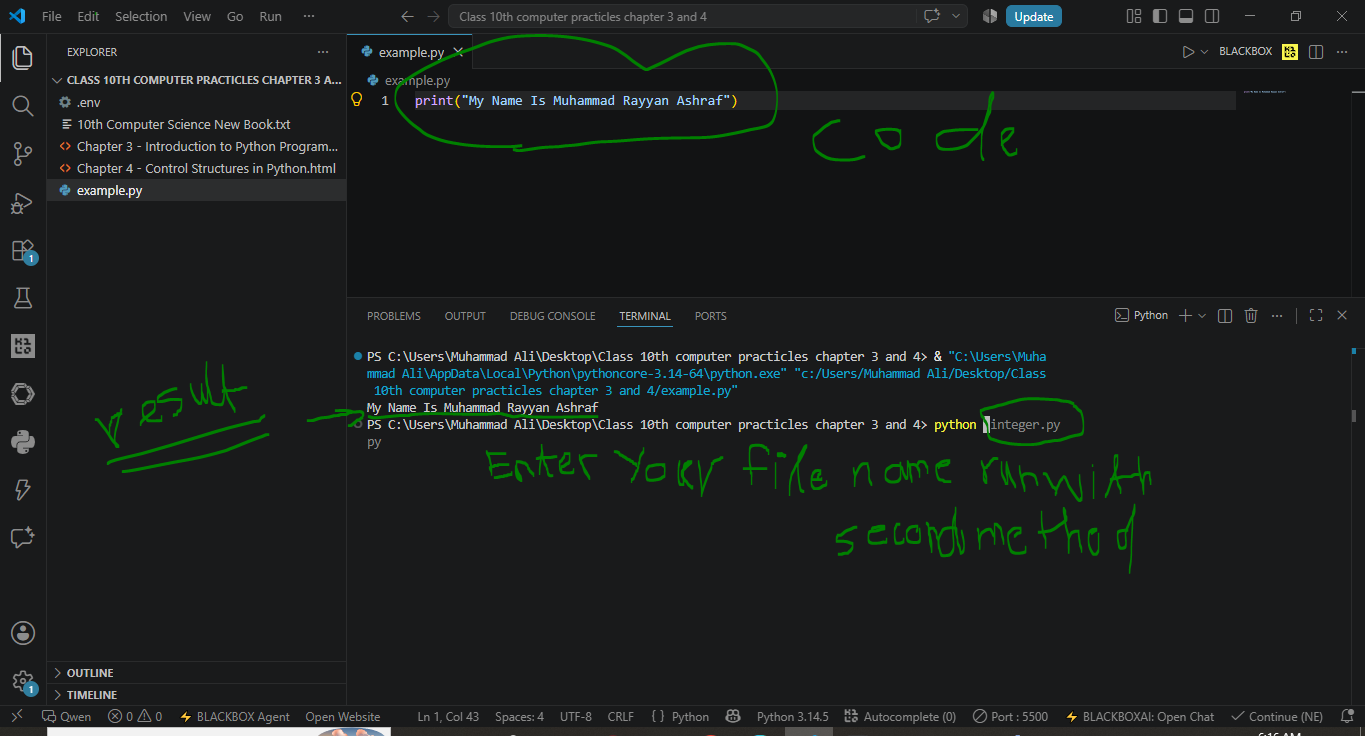
Test Setup: Create test.py and execute the test program below.
First Test Program (test.py)
print("Hello, Python!")
Hello, Python!
Google Colab Cloud Alternative: You can also use colab.research.google.com — a free cloud platform where Python comes pre-installed with scientific libraries (NumPy, Pandas, Matplotlib) without local installation!
Step-by-Step Screenshots (Tap any image to enlarge)
Step 1 — Open the official Python websiteIntro — Download & install Python overviewStep 2 — Run installer as administratorMethod 1 — Run code with the Play button in VS CodeMethod 2 — Run code from the VS Code Terminal
Unit 3 • Section 3.2
3.2 Basic Python Syntax & Structure
The print() function is used to display output text on the screen. Notice how clean Python syntax is compared to older languages:
print() Function Example
print("K2 is the second-highest mountain in the world")
print("Edhi Foundation operates the world's largest volunteer ambulance network.")
K2 is the second-highest mountain in the world
Edhi Foundation operates the world's largest volunteer ambulance network.
Python Comments
Comments are lines ignored by the interpreter. They explain code logic to programmers:
Single-line comment: Starts with # symbol.
Multi-line block: Enclosed in triple quotes ''' ... '''.
Comments Example
# This is a single line comment
print("K2 is the second-highest mountain in the world")

''' Multi-line comment block
    explaining information for students '''
print("Edhi Foundation operates the world's largest volunteer ambulance network.")
K2 is the second-highest mountain in the world
Edhi Foundation operates the world's largest volunteer ambulance network.
3.2.1 Variables in Python
A variable is a named storage container in memory holding values that can change during program execution.
Variable Modification Example
print("Hello dear students!")

age = 71
print("Azam lived for", age, "years")

age = 60
print("Iqbal lived for", age, "years")
Hello dear students!
Azam lived for 71 years
Iqbal lived for 60 years
Variable Naming Rules
Must begin with a letter (a-z, A-Z) or an underscore ( _ ).
Remaining characters can be letters, digits (0-9), or underscores.
Names are case-sensitive (e.g., age and Age are distinct).
Python reserved keywords cannot be used as variable names.
Reserved Keywords in Python: if, else, elif, for, while, break, continue, and, or, not, in, is, True, False, None
Basic Data Types
Data Type
Meaning
Example
int
Whole numbers without decimal
age = 17
float
Decimal floating-point numbers
price = 19.99
str
Text strings enclosed in quotes
name = "Ali"
bool
Boolean truth values (True or False)
is_student = True
Input and Output Operations
input(): Function displays prompt text and waits for user entry. Returns input as a string (str).
print(): Displays output value on console screen.
Greeting Input Example
name = input("Enter your name: ")
print("Hello, " + name + "!")
Enter your name: Maryam Ashraf
Hello, Maryam Ashraf!
Type Conversion with int() & float()
Convert string input into numbers using int() for whole numbers or float() for decimals.
Numeric Input Casting
user_age = int(input("Enter your age: "))
print("Your age is:", user_age)

user_height = float(input("Enter height in meters: "))
print("Your height is", user_height, "meters")
Enter your age: 16
Your age is: 16
Enter height in meters: 1.5
Your height is 1.5 meters
Unit 3 • Section 3.3
3.3 Operators & Expressions
Operators are symbols performing calculations on values (operands). Expressions combine variables, constants, and operators.
3.3.1 Arithmetic Operators
All Arithmetic Operators (Book Practical)
# Define variables
a = 10
b = 3

# Perform all arithmetic operations on these numeric variables and print results
print(a, "+", b, "=", a + b)     # Output: 10+3=13
print(a, "-", b, "=", a - b)     # Output: 10-3=7
print(a, "*", b, "=", a * b)     # Output: 10*3=30
print(a, "/", b, "=", a / b)     # Output: 10/3=3.3333333333333335
print(a, "//", b, "=", a // b)   # Output: 10//3=3   #floor division
print(a, "%", b, "=", a % b)     # Output: 10%3=1
print(a, "**", b, "=", a ** b)   # Output: 10**3=1000   # represent power operator:
# Define variables
x = 10
y = 5

# Greater than
print(x, ">", y, "=", x > y)      # Output: 10 > 5 = True
# Less than
print(x, "<", y, "=", x < y)      # Output: 10 < 5 = False
# Equal to
print(x, "==", y, "=", x == y)    # Output: 10 == 5 = False
# Not equal to
print(x, "!=", y, "=", x != y)    # Output: 10 != 5 = True
# Greater than or equal to
print(x, ">=", y, "=", x >= y)    # Output: 10 >= 5 = True
# Less than or equal to
print(x, "<=", y, "=", x <= y)    # Output: 10 <= 5 = False
# Define initial values
a = 10
b = 5

# Assignment
a = a
print("a =", a)                          # Output: a = 10

# Addition assignment
a += b
print("a after addition =", a)           # Output: a = 15

# Subtraction assignment
a -= b
print("a after subtraction =", a)        # Output: a = 10

# Multiplication assignment
a *= b
print("a after multiplication =", a)     # Output: a = 50

# Division assignment
a /= b
print("a after division =", a)           # Output: a = 10.0

# Floor division assignment
a //= b
print("a after floor division =", a)     # Output: a = 2.0

# Modulus assignment
a %= b
print("a after modulus =", a)            # Output: a = 2.0

# Exponentiation assignment
a **= b
print("a after exponentiation =", a)     # Output: a = 32.0
a = 10
a after addition = 15
a after subtraction = 10
a after multiplication = 50
a after division = 10.0
a after floor division = 2.0
a after modulus = 2.0
a after exponentiation = 32.0
3.3.4 Logical Operators
Logical operators are used to combine multiple conditions or expressions. The most common logical operators are and, or, and not — they perform logical operations and return Boolean values (True or False) based on the evaluation of the expressions involved.
All Logical Operators (Book Practical)
# Define variables
x = True
y = False

# Logical AND
logical_and = x and y
print(x, "and", y, "=", logical_and)      # Output: True and False = False

# Logical OR
logical_or = x or y
print(x, "or", y, "=", logical_or)        # Output: True or False = True

# Logical NOT
logical_not_x = not x
print("not", x, "=", logical_not_x)       # Output: not True = False

logical_not_y = not y
print("not", y, "=", logical_not_y)       # Output: not False = True
True and False = False
True or False = True
not True = False
not False = True
3.3.5 Operator Precedence
Precedence rules determine evaluation order:
Parentheses ( ) — highest priority.
Exponentiation ** — right-associative power operator.
Multiplication / Division / Modulo (*, /, //, %).
Addition / Subtraction (+, -).
Precedence Worked Textbook Example
print(4 * 3 + 10 / 2 - 11 % 3)
15.0
Book full demonstration program: (note the f before each string — in Python, f-strings are used for string interpolation, embedding variables or expressions inside a string):
Do You Know? In Python, the f before a string is used for string interpolation (embedding variables or expressions inside a string). Exponentiation ** is right associative — when there are multiple exponents, Python evaluates them from right to left (e.g., 2 ** 3 ** 2 = 2 ** 9 = 512).
Cyber Interactive Visualizer Suite
Visual Concepts Studio
Interact directly with RAM memory allocation, operator precedence step evaluator, and First-Come First-Served process scheduler!
Real-time RAM Memory Inspector
Enter a Python variable assignment below to visualize memory address allocation:
Test any Python code right inside your browser! Type or edit the code below and press Run Code.
Python 3 Sandbox
# Unit 4 Practical Demo - Control Structures
temperature = 15
if temperature > 30:
    print("It's a hot day")
else:
    print("It's not a hot day")

number = 1
while number < 5:
    print("Number:", number)
    number += 1

friends = ["Sami", "Raza", "Moosa"]
for friend in friends:
    print("Welcome to:", friend)
Click "Run Code" to view program output here.
Unit 4 • Section 4.1
4.1 Decision Making
Decision making in programming allows the program to choose different actions based on conditions. This is similar to how we make decisions in real life — for example, deciding whether to take an umbrella based on the weather situation. Python provides a variety of conditional statements to implement decision making.
4.1.1 if Statement
The if statement lets us make decisions based on conditions. If the condition is true, it runs a block of code.
Indentation is Mandatory: In Python, indentation defines the structure (block/scope) of your code. Incorrect indentation may cause an IndentationError in your code.
if Statement (Book Practical)
# Syntax of if statement
# if condition:
#     code to run if the condition is true

temperature = 35
if temperature > 30:
    print("It's a hot day")
It's a hot day
4.1.2 if-else Statement
The if-else statement allows us to execute one block of code if a condition is true and another block if the condition is false.
if-else Statement (Book Practical)
# Syntax of if-else statement
# if condition:
#     code to run if the condition is true
# else:
#     code to run if the condition is false

temperature = 15
if temperature > 30:
    print("It's a hot day")
else:
    print("It's not a hot day")
It's not a hot day
4.1.3 Nested Conditions
Sometimes, we need to check multiple conditions inside another condition. This is called nesting.
Nested if Statement (Book Practical)
weather = "rainy"
temperature = 10

if weather == "rainy":
    if temperature < 15:
        print("Wear a raincoat")
    else:
        print("Take an umbrella")
else:
    print("Enjoy your day!")
Wear a raincoat
Explanation: the code checks if the weather is rainy. If it is, it then checks if the temperature is below 15 degrees. If both conditions are true, it prints "Wear a raincoat". If the weather is rainy but the temperature is not below 15, it prints "Take an umbrella". If the weather is not rainy, it prints "Enjoy your day!"
Unit 4 • Section 4.2
4.2 Looping Constructs
Loops help us repeat actions, making our code more efficient and easier to read. There are two main types of loops in Python: while loops and for loops.
4.2.1 while Loop
A while loop runs as long as a condition is true. It checks the condition before each iteration and stops running when the condition is no longer true.
while Loop (Book Practical)
# Syntax of while loop
# while condition:
#     code to run while the condition is true

number = 1
while number < 10:
    print(number)
    number += 1
1
2
3
4
5
6
7
8
9
Explanation: the loop prints the current value of the number and then adds 1 to it. This loop continues until the number reaches 10, at which point the loop stops running.
4.2.2 for Loop
A for loop repeats a block of code a specific number of times. It is commonly used to iterate over a sequence (like a list, tuple, or string).
for Loop (Book Practical)
# Syntax of for loop
# for variable in sequence:
#     code to run for each element in the sequence

friends = ["Sami", "Raza", "Moosa"]
for friend in friends:
    print("Welcome to:", friend)
Welcome to: Sami
Welcome to: Raza
Welcome to: Moosa
4.2.3 range() Function
We can use the range() function to generate a sequence of numbers, which is often used in for loops.
Three Forms of range():range(stop), range(start, stop), range(start, stop, step)
Print First 5 Whole Numbers
for i in range(5):
    print(i)
0
1
2
3
4
End Statement (end parameter of print())
The end statement is not a separate command, but rather an optional parameter of the print() function. By default, every print() ends with a newline character, but you can change what gets printed at the end using the end parameter.
end Parameter Examples
print("Azhar Shah", end=" ")
print("Ahsan")

print("Ayyan", end="***")
print("Naveed")

for i in range(1, 6):
    print(i, end=" ")
Azhar Shah Ahsan
Ayyan***Naveed
1 2 3 4 5
DO YOU KNOW? Strings in Python can use single ' ' or double " " quotation marks — like 'Ayyan' is the same as "Ayyan".
4.2.4 Nested Loops
Nested loops are loops inside other loops. For each iteration of the outer loop, the inner loop runs completely. We use nested loops when we need to perform repetitive tasks within tasks.
Example 1 - Basic Number Pattern
for i in range(3):          # Outer loop
    for j in range(4):      # Inner loop
        print(i, end=" ")
    print()                 # Separator after each outer loop
0 0 0 0
1 1 1 1
2 2 2 2
Example 2 - Right-Angled Triangle of Stars
n = 5
for i in range(1, n + 1):
    for j in range(i):      # Inner loop runs 'i' times
        print("*", end="")
    print()                 # New line after each row
*
**
***
****
*****
Unit 4 • Section 4.3
4.3 Libraries in Python
Python offers an extensive standard library that includes built-in modules and data structures. In Python, libraries are like toolboxes full of useful tools that help you solve different problems without having to build everything from scratch.
random Library
Generate Random Numbers (Book Practical)
import random

# Generate a random number between 1 to 10
number = random.randint(1, 10)
print("The random number is:", number)
The random number is: 3
(The value will be different every time the program runs — any number between 1 and 10.)
statistics Library
Calculate Mean (Book Practical)
import statistics

# Calculate the mean of a list of numbers
data = [23, 45, 67, 89, 12, 44, 56]
mean_value = statistics.mean(data)
print("The mean value is:", mean_value)
The mean value is: 48.0
Explanation: the statistics library is a great tool for performing basic statistical calculations, such as finding the mean, median, and mode of a set of data. This can be particularly useful in data analysis tasks.
TOOL: The statistics module is not available in the in-browser sandbox — run this program on your PC (Python 3) to see the output. When importing libraries, make sure to only import what you need. Explore more libraries at https://docs.python.org/3/
Unit 4 • Section 4.4
4.4 Lists in Python
In Python, a list is a versatile data structure that can hold a collection of items. You can create, access, and modify lists easily.
4.4.1 Creating Lists
A list is created by placing items inside square brackets [ ], separated by commas. Lists can contain items of different types, such as numbers, strings, or even other lists.
In Python programming, testing and debugging are essential practices to ensure that your code works correctly and efficiently.
4.5.1 Testing
Testing is the process of running your code with various inputs to check if it behaves as expected. The goal is to find and fix any issues before the code is used in real-world applications.
Type of Testing
What it checks
Unit Testing
Tests individual parts of the code (like functions or classes) in isolation. Python's unittest module is commonly used for this.
Integration Testing
Checks how different parts of the code work together.
Functional Testing
Validates that the software behaves as expected from the user's perspective.
Regression Testing
Ensures that new changes don't affect the existing functionality.
Unit Testing Example (unittest module)
import unittest

def add(a, b):
    return a + b

class TestAdd(unittest.TestCase):
    def test_add(self):
        self.assertEqual(add(2, 3), 5)
        self.assertEqual(add(-1, 1), 0)

if __name__ == "__main__":
    unittest.main()
.
----------------------------------------------------------------------
Ran 1 test in 0.001s
OK
4.5.2 Debugging
Debugging is the process of finding and fixing errors (bugs) in your code. It involves identifying the root cause of problems and making the necessary changes.
Print Statements: adding print statements to check the values of variables at different stages of the code.
Debugging Tools: using tools like pdb (Python Debugger) to step through the code, inspect variables, and understand the flow of execution.
Error Messages: reading and interpreting error messages to locate the source of the problem.
Cyber Interactive Visualizer Suite
Visual Concepts Studio
Interact directly with RAM memory allocation, a while-loop flow simulator, and a live list operations laboratory!
Real-time RAM Memory Inspector
Enter a Python variable assignment below to visualize memory address allocation:
0x7FFF01
temperature
35
int
0x7FFF02
weather
"rainy"
str
0x7FFF03
number
1
int
While Loop Flow Simulator
Simulating the book example: number = 1; while number < 10: print(number); number += 1
Loop output will appear here.
Current: number = 1 | condition 1 < 10 = True
List Operations Laboratory
Current list: ["Mango", "Apple", "Banana"] — try the book's list methods live:
['Mango', 'Apple', 'Banana']
Exercise Practicals Lab
Textbook Exam Practicals Solver
All five textbook exercise practicals are pre-loaded with interactive validation!
Practical 1: Odd Numbers Between 1 and 20
Write a Python program using a loop that prints all the odd numbers between 1 and 20.
odd_numbers.py
for i in range(1, 21):
    if i % 2 != 0:
        print(i, end=" ")
1 3 5 7 9 11 13 15 17 19
Practical 2: Random Numbers & Their Mean
(a) Generate a list of 5 random numbers between 1 and 20. (b) Use the statistics library to calculate and print the mean.
random_mean.py
import random
import statistics

numbers = []
for i in range(5):
    numbers.append(random.randint(1, 20))

print("The random numbers are:", numbers)
print("The mean is:", statistics.mean(numbers))
The random numbers are: [7, 14, 3, 19, 11]
The mean is: 10.8
Note: run this on your PC — the statistics module is not available in the browser sandbox. The random numbers will differ each run.
Practical 3: Pakistani Dishes List
(a) Create the list ["Biryani", "Nihari", "Karahi", "Seekh Kebabs"]. (b) Add "Quorma". (c) Change "Karahi" to "Chicken Karahi". (d) Remove "Nihari".
Print stars (asterisk) in a rectangular pattern using nested loops with three rows and five columns.
rectangle_stars.py
for i in range(3):          # 3 rows
    for j in range(5):      # 5 columns
        print("*", end="")
    print()
*****
*****
*****
Practical 5: Multiplication Table (1 to 5)
Write the output of the following code — Multiplication Table (1-5) using nested loops and f-strings.
multiplication_table.py
for i in range(1, 6):           # Outer: 1 to 5
    for j in range(1, 11):      # Inner: 1 to 10
        print(f"{i} x {j} = {i * j:2d}", end=" ")
    print()                     # New line after each table
1 x 1 = 1 1 x 2 = 2 1 x 3 = 3 1 x 4 = 4 1 x 5 = 5 1 x 6 = 6 1 x 7 = 7 1 x 8 = 8 1 x 9 = 9 1 x 10 = 10
2 x 1 = 2 2 x 2 = 4 2 x 3 = 6 2 x 4 = 8 2 x 5 = 10 2 x 6 = 12 2 x 7 = 14 2 x 8 = 16 2 x 9 = 18 2 x 10 = 20
3 x 1 = 3 3 x 2 = 6 3 x 3 = 9 3 x 4 = 12 3 x 5 = 15 3 x 6 = 18 3 x 7 = 21 3 x 8 = 24 3 x 9 = 27 3 x 10 = 30
4 x 1 = 4 4 x 2 = 8 4 x 3 = 12 4 x 4 = 16 4 x 5 = 20 4 x 6 = 24 4 x 7 = 28 4 x 8 = 32 4 x 9 = 36 4 x 10 = 40
5 x 1 = 5 5 x 2 = 10 5 x 3 = 15 5 x 4 = 20 5 x 5 = 25 5 x 6 = 30 5 x 7 = 35 5 x 8 = 40 5 x 9 = 45 5 x 10 = 50
Knowledge Verification
Gamified Practice Quiz
Test your knowledge to gain XP and level up your programmer badge!
Question 1: Which statement is used to execute code when a condition is false?
Recap
Chapter Summary
Decision making:if, if-else, and nested if let the program choose actions based on conditions. Indentation defines the block/scope.
while loop: repeats code as long as a condition is true (checks before each iteration).
for loop: iterates over a sequence (list, tuple, string).